Rescheduling Bitrix24 activities: the Krest-NN case
A deal’s next-action time changed while its existing activity kept the old deadline. How BYstudio corrected the synchronisation and tested rescheduling.
A new time in the deal, an old deadline on the activity
Krest-NN already had Bitrix24. BYstudio was refining a separate B2C V1 pipeline: order stages, required data, activities and next-action control. This article examines one configuration defect found on 16 October 2026.
The test changed the next-action deadline without moving the deal to another stage. The field updated, but the existing activity retained its old time. The delayed control did not begin a new wait either. Saving the deal was not enough to keep all three elements aligned.
This can leave staff with conflicting instructions: one agreed time in the deal and another in the activity list. The archive does not establish lost enquiries or revenue. What it confirms is the technical mismatch.
What changed in the verified example
- Before the correction
- On 16 October, a technical deal’s next-action time moved from 17:38 to 17:40 and then 17:55 within the same stage. The existing activity retained 17:38. The implementation checkpoint and debugger record show no new control wait.
- After the correction
- In the server test on 16 October, an automatically created activity was scheduled for 19 October at 10:15. Changing the deal field to 10:45 moved the activity deadline accordingly. Here, 19 October is the scheduled deadline, not the test date.
- Additional check
- The same technical test records forward and backward rescheduling and recognition of a replacement activity. The technical record was closed and its activities completed afterwards.
This compares a specific configuration within the project. The company’s complete pre-project workflow has not been reconstructed, so this episode is not presented as a move from having no CRM to automation.
Synchronisation with explicit boundaries
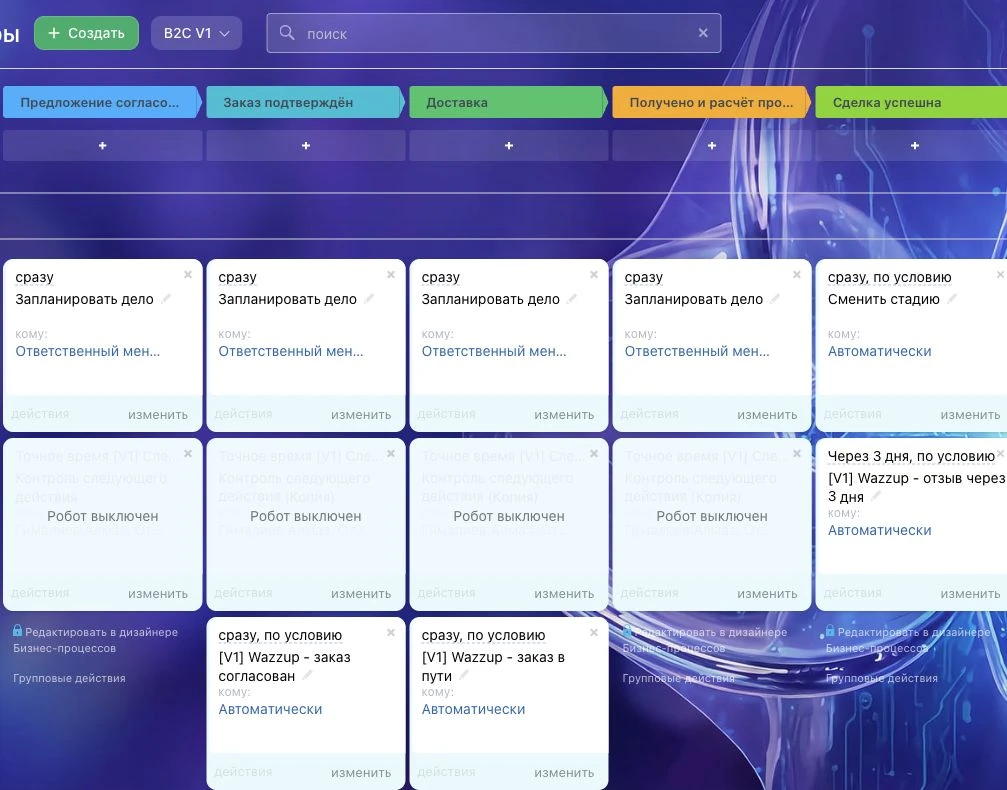
A field-change trigger was tried first. It did not reschedule the existing activity in this configuration, and the temporary trigger was removed. With workflow-designer access restricted by the active plan, a separate synchronisation service was agreed and deployed. The existing external enquiry bot was left in place.
- Scope: four agreed V1 stages after qualification. The service matches the next-action deadline to the identified open activity created by automation.
- When the field changes, the corresponding activity is rescheduled. A replacement activity must be recognised in place of the previous one.
- Manual and completed activities are excluded. A completed activity must not reopen merely because the deadline field remains populated.
- Four earlier native next-deadline notifications were disabled during the switch. Initial 15-minute and two-hour controls were retained as a separate workflow.
What the evidence establishes
- Technical deal
- The deployment checkpoint dated 16 October records rescheduling an existing activity and recognising an automatically created replacement. This was observed on a technical record in the production portal.
- Offline tests
- The 16 October report lists 35 passing local tests for the whole service. They include moving times later and earlier, suppressing the old-deadline alert, excluding manual and completed activities, stage changes and working-calendar boundaries. These use simulated API responses, not 35 customer orders.
- Operational notifications
- The supplied archive does not confirm an overdue alert delivered after rescheduling during working hours or mobile push receipt. A local logic test does not establish delivery.
- Business impact
- There is no comparable before-and-after measurement of overdue work, response speed or sales. A successful technical reschedule does not prove revenue growth or full team adoption.
How to accept a similar correction in your CRM
The following is a recommended acceptance scenario for another project. It extends beyond Krest-NN’s verified results. Use an agreed technical record and test recipients, without messaging customers.
- Record the starting stage, next-action field, associated activity, its deadline and completion state. Define the time zone and acceptable update delay.
- Keep the stage unchanged and move the deadline later, then earlier. Check the field and activity after each change. Confirm no extra activity was created.
- Complete the old activity and create the agreed replacement. Verify recognition of the replacement and that the completed activity stays closed.
- Add a separate manual activity. Updating the next-action deadline should leave it unchanged if it is outside the synchronisation scope.
- Check a stage change and deal closure. Record which activities completed, which remained and why.
- Separately wait for a real control event in the agreed working window. Match the server record, CRM event and delivery to a test recipient. Check for stale alerts and unnecessary duplicates.
- Name the service owner, where to check its status and how recovery works. Agree who rechecks it after changes to fields, automation, the plan or permissions.
If only the field and activity dates have been verified, accept synchronisation separately and leave notification delivery open. This makes the outcome precise instead of treating “everything works” as an acceptance result.
Full CRM acceptance checklistEvidence behind the article
The case account was checked against the private Krest-NN package: the defect record and trigger experiment on 16 October, that day’s deployment and technical test checkpoint, the 35-test offline report and the anonymised 19 October configuration. Raw logs and access details are not published. No new CRM changes or test enquiries were made for this article.
Bitrix24’s general documentation covers activity scheduling, automation timing and working schedules. Those capabilities alone do not establish that a particular existing configuration handles rescheduling correctly. Documentation checked on 22 October 2026.
Common questions
Why did changing the deal field leave the activity deadline unchanged?
In the tested configuration, the next-action field, existing activity and delayed control did not update together. This describes a particular Krest-NN configuration, not a universal Bitrix24 limitation. Reproduce the cause separately in another system.
Does this always require an external service?
No. Check the native tools on your plan and the existing automation first. In this project, a trigger experiment did not reschedule the existing activity and access to the workflow designer was restricted by the plan. A separate service was agreed for this configuration.
Should every open activity on a deal be rescheduled?
That was not the project’s approach. Synchronisation applies to the identified automation-created activity in the agreed V1 stages. Manual and completed activities are excluded. Define the boundaries before changing another workflow.
Does a successful reschedule prove notification delivery?
No. Matching the field and activity times verifies synchronisation. Execution during working hours, recipient delivery and mobile push need separate checks. The project archive does not confirm those operational notifications after rescheduling.
Explore the wider project
Activity deadlines were one part of the refinement. The case covers V1 stages, required data and manual payment reconciliation. For a similar task, start with one mismatch and an outcome you can verify.